
Introduction
Video editing has evolved rapidly over the past few years. What once required complex timelines, manual cuts, and hours of effort can now be done in a fraction of the time using artificial intelligence. For creators, marketers, and businesses, this shift has opened up new possibilities to produce high-quality content faster and more efficiently.
Among the many tools entering this space, Descript has gained significant attention. Known for its unique approach to editing—where users can edit video and audio simply by editing text—Descript stands out as a modern solution designed for speed and simplicity.
In this review, we’ll take a deep dive into Descript’s features, usability, pros and cons, and how it compares with other tools to help you decide if it’s the right choice for your workflow.
What is Descript?
Descript is an AI-powered audio and video editing platform that allows users to edit media files as easily as editing a document. Instead of working with complex timelines, users can simply delete or modify text to edit the corresponding parts of a video or audio file.
This approach makes it especially appealing to:
- Content creators
- YouTubers
- Podcasters
- Digital marketers
- Remote teams
The tool is designed to reduce the technical barrier in video editing, making it accessible even to beginners without prior editing experience.
Key Features of Descript
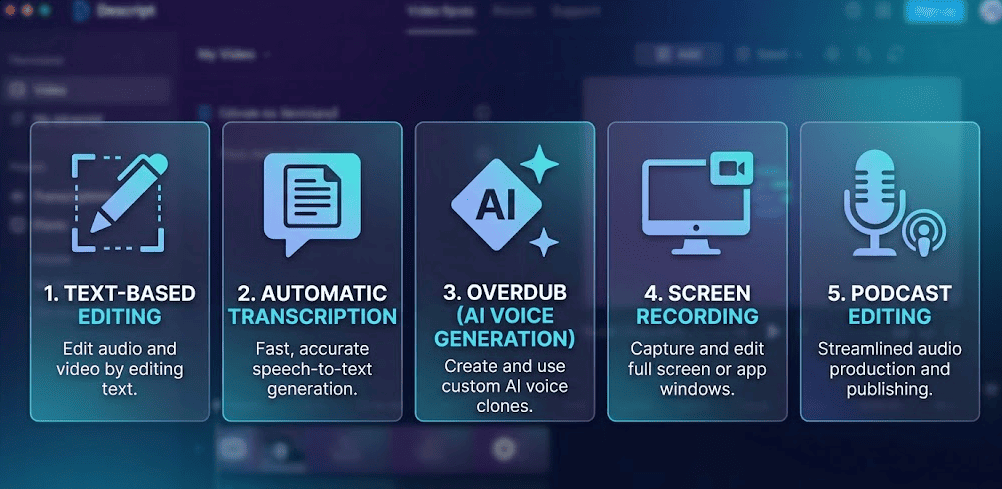
1. Text-Based Editing
The standout feature of Descript is its text-based editing. Once you upload your video or audio file, the platform automatically transcribes it into text. You can then edit the content just like a Word document.
For example:
- Delete a sentence → that portion is removed from the video
- Rearrange text → video clips rearrange accordingly
This dramatically simplifies the editing process and saves time.
2. Automatic Transcription
Descript offers fast and accurate transcription for both video and audio files. This is particularly useful for:
- Creating subtitles
- Editing podcasts
- Repurposing content into blogs
The transcription feature also improves accessibility and SEO when used for captions.
3. Overdub (AI Voice Generation)
One of Descript’s most innovative features is Overdub. It allows users to create realistic voiceovers using AI.
Instead of re-recording audio, you can:
- Type the missing words
- Generate voice using AI
This is extremely useful for correcting mistakes or updating content without starting from scratch.
4. Screen Recording
Descript includes a built-in screen recording feature, making it ideal for:
- Tutorials
- Product demos
- Online courses
Users can record their screen and webcam simultaneously, then edit the footage using the same text-based workflow.
5. Podcast Editing
Descript is widely used by podcasters due to its powerful audio editing capabilities.
Key podcast features include:
- Removing filler words (like “um” and “uh”)
- Studio-quality sound enhancement
- Multi-track editing
This makes it easier to produce professional-quality podcasts without advanced audio knowledge.
How to Use Descript (Step-by-Step Guide)
One of the biggest advantages of Descript is how simple the workflow is. Here’s how you can use it:
Step 1: Upload Your File
Start by uploading your video or audio file into the platform.
Step 2: Transcription
Descript automatically converts your speech into text within minutes.
Step 3: Edit the Text
This is where the magic happens:
- Delete unwanted sentences
- Cut pauses or filler words
- Rearrange content
All changes reflect directly in the video.
Step 4: Enhance Your Content
You can now:
- Add captions
- Insert transitions
- Improve audio quality
- Add voiceovers
Step 5: Export
Once editing is complete, export your video in your desired format for platforms like YouTube, Instagram, or your website.
Pros and Cons
Pros
- Extremely beginner-friendly
- Saves time with AI automation
- Unique text-based editing approach
- Great for podcasts and tutorials
- Built-in transcription and screen recording
Cons
- Limited advanced editing compared to professional tools
- May not suit high-end video production needs
- Requires internet for some features
Descript vs Other Video Editing Tools
To understand Descript better, let’s compare it with other popular tools:
Descript vs Adobe Premiere Pro
- Premiere Pro offers advanced editing features
- Descript focuses on simplicity and speed
👉 Best choice:
- Beginners → Descript
- Professionals → Premiere Pro
Descript vs CapCut
- CapCut is great for social media edits
- Descript is better for long-form and content-driven editing
Descript vs Canva Video Editor
- Canva is simple but limited
- Descript offers more powerful AI features
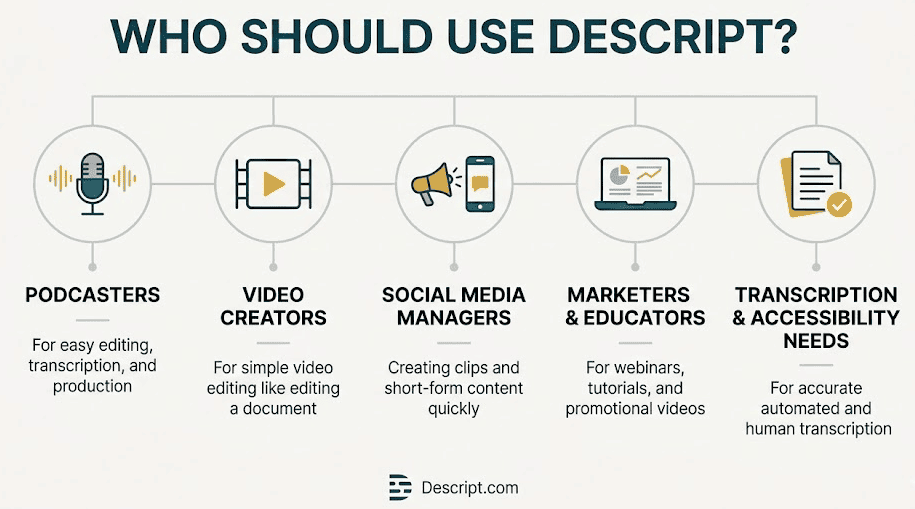
Who Should Use Descript?
Descript is best suited for:
- YouTubers who want faster editing
- Podcasters looking for easy audio editing
- Marketers creating content at scale
- Beginners who want a simple editing solution
It may not be ideal for:
- Advanced video editors
- Film production teams
Pricing
Descript offers a free plan with basic features, along with paid plans that unlock advanced capabilities such as:
- Higher transcription limits
- Advanced editing tools
- Premium AI features
The pricing is competitive considering the value it provides.
Real-World Use Cases
Descript is used in various scenarios:
Content Creation
Creators can quickly edit videos and publish content consistently.
Podcast Production
Podcasters can clean audio and edit episodes faster.
Marketing Teams
Teams can produce explainer videos, ads, and tutorials efficiently.
Final Verdict
Descript is not just another video editing tool—it represents a shift in how content is created and edited. By combining AI with a simple interface, it removes many of the traditional barriers associated with video production.
If your goal is to:
- Save time
- Simplify editing
- Scale content production
Then Descript is definitely worth considering.
While it may not replace advanced tools for professional editors, it excels in speed, ease of use, and accessibility—making it one of the best AI-powered editing tools available today.
Conclusion
As AI continues to shape the future of content creation, tools like Descript are leading the way. Whether you’re a beginner or an experienced creator, adopting AI-driven workflows can significantly improve your productivity.
If you’re looking for a smarter, faster way to edit videos and audio, Descript is a strong contender in 2026.