
Introduction
The demand for content has never been higher. Creators today are expected to consistently produce videos, podcasts, and social media content while maintaining quality and engagement. However, traditional editing workflows can be time-consuming and often require technical expertise.
This is where artificial intelligence is making a major impact. AI-powered tools are helping creators simplify their editing processes, reduce production time, and scale content creation like never before. One of the leading tools enabling this shift is Descript, which allows users to edit audio and video by simply editing text.
In this guide, we’ll break down how modern creators are using AI to edit podcasts and videos faster, along with a practical workflow you can follow.
The Challenge of Traditional Editing

Before AI tools became popular, creators had to rely on timeline-based editing software. This approach required:
- Manual cutting and trimming
- Syncing audio and video
- Removing filler words manually
- Adding subtitles separately
This process could take hours, even for short content. For creators producing content regularly, this was a major bottleneck.
The Shift to AI-Powered Workflows
AI has introduced a new way of editing content. Instead of working on timelines, creators can now:
- Edit content through text
- Automatically remove unnecessary parts
- Enhance audio quality instantly
- Generate captions with one click
This shift has made editing faster, simpler, and more scalable.
The Modern AI Editing Workflow
Let’s break down the step-by-step workflow that creators are using today.
Step 1: Record Content
The process begins with recording content. This could include:
- YouTube videos
- Podcasts
- Interviews
- Tutorials
Creators focus more on delivering value rather than worrying about mistakes, knowing that AI can fix them later.
Step 2: Upload to an AI Tool
Once the recording is complete, the file is uploaded to an AI editing platform.
The tool processes the content and prepares it for editing. This step usually takes only a few minutes, depending on the file size.
Step 3: Automatic Transcription
AI tools automatically convert speech into text. This is a key step because it enables text-based editing.
Benefits of transcription:
- Easy navigation through content
- Faster editing
- Improved accessibility
- Better SEO for video content
Step 4: Edit Using Text
This is where AI completely changes the workflow.
Instead of:
- Scrubbing through timelines
- Cutting clips manually
Creators simply:
- Delete sentences
- Rearrange text
- Remove unnecessary sections
For example:
- Deleting a paragraph removes that portion of the video
- Moving text rearranges video segments
This makes editing intuitive and significantly faster.
Step 5: Remove Filler Words and Mistakes
AI tools can automatically detect and remove filler words such as:
- “Um”
- “Uh”
- Repeated phrases
They can also eliminate long pauses, making the content more polished.
This step alone can save a significant amount of editing time.
Step 6: Enhance Audio and Video
After basic editing, creators enhance their content by:
- Improving audio clarity
- Adding background music
- Adjusting volume levels
- Applying visual transitions
AI tools often include one-click options for audio enhancement, making it easy to achieve professional results.
Step 7: Add Subtitles and Captions
Captions are essential for engagement, especially on social media.
AI tools automatically generate subtitles, which can be:
- Edited for accuracy
- Styled for branding
- Exported with the video
This improves accessibility and increases viewer retention.
Step 8: Repurpose Content
One of the biggest advantages of AI workflows is content repurposing.
From a single video, creators can generate:
- Short clips for social media
- Blog content from transcripts
- Highlights for marketing campaigns
This helps maximize the value of each piece of content.
Step 9: Export and Publish
Finally, the content is exported in the desired format and published across platforms such as:
- YouTube
- Websites
The entire process, which used to take hours, can now be completed much faster.
Benefits of AI Editing Workflows
1. Speed and Efficiency
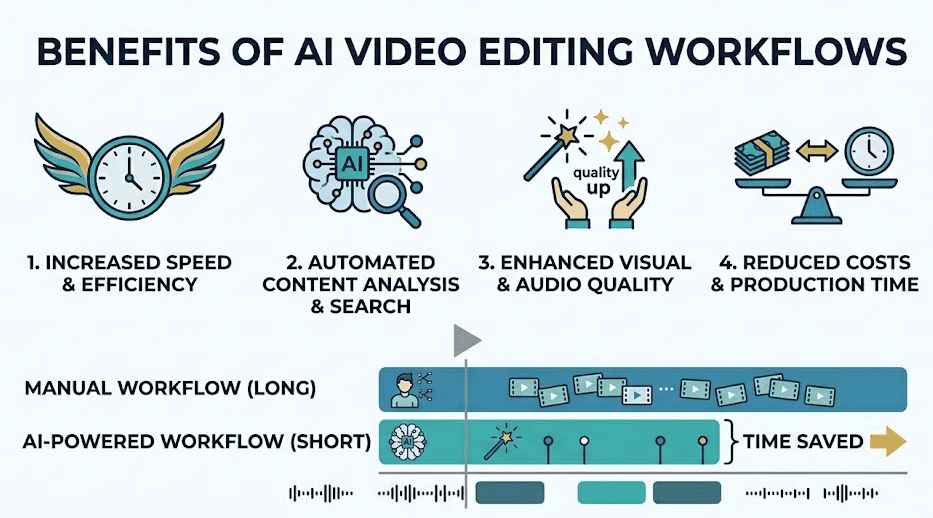
AI significantly reduces editing time, allowing creators to focus more on content creation rather than technical tasks.
2. Scalability
Creators can produce more content without increasing workload, making it easier to grow their audience.
3. Accessibility
Even beginners can create professional-quality content without prior editing experience.
4. Consistency
AI tools help maintain a consistent editing style, which is important for branding.
Real-World Use Cases
YouTubers
YouTubers use AI tools to edit videos quickly, allowing them to maintain consistent upload schedules.
Podcasters
Podcasters rely on AI for:
- Cleaning audio
- Removing filler words
- Editing episodes efficiently
Marketers
Marketing teams use AI to create:
- Product demos
- Ad creatives
- Educational content
Online Educators
Educators use AI tools to:
- Edit course videos
- Add captions
- Improve content quality
Tips to Optimize Your Workflow
To get the best results from AI editing:
- Record high-quality audio for better transcription
- Structure your content clearly
- Use captions to improve engagement
- Combine AI automation with manual tweaks
Why This Workflow Matters
The ability to produce content quickly is a major competitive advantage. Creators who adopt AI workflows can:
- Stay consistent
- Scale faster
- Focus on creativity rather than technical tasks
As content demand continues to grow, efficiency becomes just as important as quality.
Final Thoughts
AI is redefining how content is created and edited. Tools like Descript are leading this transformation by simplifying complex workflows and making video editing accessible to everyone.
Whether you’re a beginner or an experienced creator, adopting AI-powered editing workflows can significantly improve your productivity and output.
Conclusion
The future of content creation lies in speed, efficiency, and scalability. AI tools are not just making editing easier—they are changing the way creators approach content production altogether.
If you’re looking to save time, improve quality, and scale your content, integrating AI into your workflow is a smart move.